Table of contents:
Offerwall RPM is not determined by a single factor, but by a combination of display frequency, targeted pages, variety of options offered, and how loyal your site traffic is. This guide covers how to optimize each of these factors so that Offerwall truly has a real impact on revenue.
Remember the definition: In the context of Offerwall, “conversion” means the visitor successfully completes one of the options (watching an ad, completing a survey, etc.) so they are no longer blocked from the content. Offerwall RPM is ultimately the product of how often the message is shown and what percentage of visitors are actually willing to complete it.
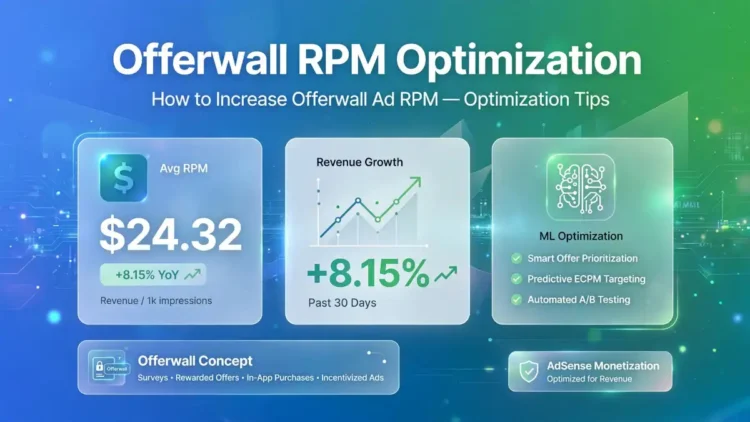
+8.15%Revenue increase from ML Optimization feature
+10.2%Conversion rate increase from the same feature
SelectiveThe main principle of Offerwall page targeting
Main Factors Affecting Offerwall RPM
Display Frequency (Measurement)
Number of page visits before Offerwall is shown. Too frequent reduces user comfort, too rare misses monetization opportunities.
Targeted Pages
Showing Offerwall evenly on all pages is usually less optimal than selectively targeting high-value pages.
Option Variety
The more choices you offer (rewarded ads, surveys, micropayments), the greater the chance visitors will find an option they feel is “worth it”.
1. Enable the Offerwall Optimization Feature
Since Google launched it on December 10, 2025, the Offerwall Optimization feature uses machine learning to automatically determine the best display frequency based specifically on your site’s engagement, revenue, and bounce rate data — not generic assumptions. Based on official data, this feature has been proven to increase total ad revenue by 8.15% and conversion rate by 10.2% compared to manual settings configured by publishers themselves. If you are already using Offerwall but have not enabled this feature, check the “Optimization” setting in the Privacy & messaging menu on your AdSense dashboard.
2. Target Pages Selectively, Not Evenly
- Prioritize high-value evergreen content. Articles that continue to get repeat visits are more ideal than pages with one-time traffic.
- Exclude important entry/registration pages. Don’t show Offerwall on pages that are crucial for your core business conversions (e.g., checkout pages or contact forms).
- Test gradually per content category. Start with one article category first, measure its impact on RPM and bounce rate, then expand to other categories if results are positive.
3. Increase the Variety of Options Offered
Not all visitors have the same preference — some are more comfortable watching a short ad, others prefer to fill out a short survey, and some may be willing to pay a micropayment for instant, uninterrupted access. Providing more than one option increases the likelihood that visitors will find a way they consider most “fair” to gain access, which ultimately drives higher overall conversion rates and RPM compared to offering only a single option.
4. Set Closability in a Balanced Way
| Closability Setting | Impact |
|---|---|
| Low (hard to close) | Higher conversion, but risk of increased bounce rate and visitor complaints |
| High (easy to close multiple times) | More comfortable user experience, but conversion and RPM may be lower |
| Balanced (2-3 times before blocking) | The middle ground generally recommended as a starting point before further testing |
There is no single closability number that is absolutely right for all sites — your audience characteristics and content type help determine the most suitable balance point, so gradual testing is still necessary.
5. Focus on Traffic Quality, Not Just Volume
Visitors who come via organic search and are genuinely interested in your content topic are far more likely to complete the Offerwall than traffic from irrelevant sources or those just stopping by briefly. Investing in SEO and quality content that builds a loyal audience also indirectly improves Offerwall performance, because visitors who already trust the value of your content tend to be more willing to “pay” through one of the options offered.
Metrics to Monitor Regularly
- Offerwall conversion rate. Percentage of visitors who successfully complete one of the options compared to the total who saw the message.
- Impact on bounce rate. Make sure Offerwall implementation does not push too many visitors to leave the site before interacting.
- Overall site RPM. Compare periods before and after implementing/changing Offerwall settings to assess the real impact on total revenue.
- Returning visitor ratio. An indicator of whether Offerwall affects visitor loyalty in the medium to long term.
Want to check the Offerwall Optimization settings in your AdSense account?
Open the Official Offerwall Optimization Guide
Also read: What Is Offerwall Ads? AdSense’s New Monetization Feature to understand the basics, or How to Increase AdSense Ad CTR Safely to complement your site monetization strategy.
FAQ
1. What is the fastest way to increase Offerwall RPM?
Enabling the machine learning-based Offerwall Optimization feature is the most practical step, as Google automatically adjusts display frequency based on your own site data, proven to increase average revenue by 8.15%.
2. Does showing Offerwall on all pages increase RPM?
Not always. Targeting pages selectively — especially high-value evergreen content — generally yields better results than showing it on all pages without consideration.
3. Does offering many options (ads, surveys, micropayments) really help?
Yes. A variety of options increases the likelihood that visitors will find a method they consider most suitable, which directly drives conversion rate and RPM.
4. How to determine the right closability setting?
There is no fixed number — start with a balanced setting (2-3 closings before blocking), then test and adjust based on your own site’s conversion and bounce rate data.
5. Does traffic quality affect Offerwall performance?
It has a huge impact. Organic visitors who are genuinely interested in the content are far more likely to complete the Offerwall than irrelevant traffic or those just passing through.
Conclusion
Increasing Offerwall RPM is not about showing it as often as possible on all pages, but about a more careful combination of strategies: enabling machine learning-based Optimization, targeting pages selectively, providing a variety of options for visitors, and setting closability in a balanced way between monetization and user comfort. Ultimately, the most fundamental foundation remains traffic and content quality — Offerwall will only be effective if visitors truly value the content they access, so they are willing to complete one of the options offered instead of leaving your site immediately.
Baca Juga: