Table of contents:
Choosing the right AdSense ad size can have a significant impact on your site’s CTR and revenue. But before spending time selecting fixed sizes one by one, it is important to know that Google now directs publishers toward responsive ads by default — rather than fixed sizes as the primary strategy.
Important update: In recent years, AdSense display ad units have been responsive by default when you create a new ad unit — the size automatically adjusts to the available space across different devices. Manually choosing a fixed size is now more useful when you need specific control, such as for an ad slot with strict dimensions, rather than as the default approach recommended by Google.
ResponsiveAdSense default for new ad units
~90%Inventory covered by the top 5 sizes
65–75%Impressions from mobile devices (non-B2B)
What Are CTR and CPC in the Context of Ad Sizes?
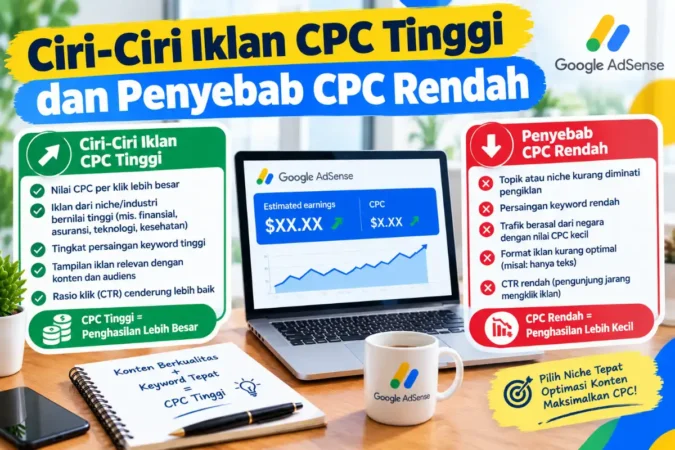
CTR (Click-Through Rate) is the ratio of ad clicks to the number of impressions, while CPC (Cost Per Click) is the revenue a publisher receives per click. Actual ad revenue is a combination of both — an ad size with high CTR and moderate CPC can outperform a size with high CPC but low CTR. You can monitor both metrics through the Reports section in your AdSense dashboard and filter the data by ad unit size.
5 Best-Performing Ad Sizes (Covering ~90% of Inventory)
300×250 — Medium Rectangle
Highly flexible, suitable for both sidebars and within content, and supports desktop and mobile devices. It often records strong CTR because it blends naturally with the content.
336×280 — Large Rectangle
Larger and more prominent, making it ideal for placement between content paragraphs on sufficiently wide screens.
728×90 — Leaderboard
A classic format for desktop website headers, but less suitable for mobile displays.
300×600 — Half Page
A large vertical banner for sidebars that can attract advertisers looking for more space to communicate their brand message.
320×50 — Mobile Banner
A commonly available mobile size that is relatively unobtrusive and suitable for placement near the top or bottom of a mobile screen.
These five sizes are consistently cited as covering around 90% of the ad inventory available across the Google network. Other sizes such as 970×250, 300×1050, and 160×600 are still supported, but they tend to have significantly less advertiser inventory than the five primary sizes above.
Other Ad Sizes Still Supported
| Size | Name | Notes |
|---|---|---|
| 320×100 | Large Mobile Banner | A larger mobile alternative to 320×50, suitable below the header |
| 160×600 | Wide Skyscraper | For narrow sidebars, but less prominent than 300×600 |
| 300×1050 | Portrait | Focused on brand awareness and requires significant vertical space |
| 970×250 | Billboard | Very wide, suitable for the top or bottom of desktop pages |
Why Google Is Now Promoting Responsive Ads
- Automatically adapts to different devices. Responsive ads help avoid layout problems when the available ad space becomes narrower on mobile devices, which can happen with fixed-size ads.
- Recommended as the first option. When creating a new ad unit in the AdSense dashboard, the responsive option is now presented as the default recommended choice.
- Reduces the need for repeated manual design. You do not need to create and test many different fixed sizes individually for every ad slot.
However, responsive ads also have limitations: you do not have complete control over the exact size that will be displayed, making size-specific A/B testing more difficult than with manually implemented fixed-size ad units.
Tips for Optimizing Ad Placement
- Place ads close to the main content. Ads that naturally blend into the reading flow tend to receive better CTR than ads placed far away from the main content.
- Prioritize the mobile experience. Since most non-B2B impressions now come from mobile devices, make sure your ad placement does not interfere with the reading experience on smaller screens.
- Pay attention to site speed. Slow-loading websites may lose visitors before they have a chance to see the ads, regardless of how well the ad size has been optimized.
- Test and compare regularly. Use ad unit rotation or compare equivalent time periods to determine which combination of ad size and placement generates the best results for your site.
Want to explore high-CPC keyword strategies to support your ad revenue?
Read How to Research High-CPC Keywords
Also read: Highest-CPC AdSense Keyword List and Types of AdSense Ad Units to complete your website monetization strategy.
FAQ
1. Are fixed ad sizes still relevant in 2026?
They are still relevant when you need specific control or have an ad slot with strict dimensions, but Google now recommends responsive ads as the default approach for most publishers.
2. Which ad size is the most profitable for beginners?
300×250 (Medium Rectangle) is often recommended as a starting point because it is flexible enough to be placed in various positions and supports both desktop and mobile devices.
3. Do responsive ads generate more revenue than fixed-size ads?
Not necessarily. However, responsive ads reduce the risk of poor layouts across different devices, which can indirectly help maintain a good user experience and CTR.
4. Why is 320×50 recommended over 320×100 for mobile?
Both are valid options, but 320×50 is more consistently mentioned as one of the five sizes with the broadest inventory coverage based on the data referenced here, while 320×100 remains a good alternative when you need slightly more space.
5. How can I determine which ad size is most profitable on my own website?
Compare the performance of several ad unit sizes over the same time period through AdSense Reports. Focus on the combination of CTR and CPC rather than either metric alone to determine which size is genuinely the most profitable for your site.
Baca Juga:
Conclusion
Choosing the right AdSense ad size can still affect your site’s monetization performance, with 300×250, 336×280, 728×90, 300×600, and 320×50 representing five sizes that cover a large portion of available ad inventory. However, instead of focusing too heavily on selecting and testing fixed sizes individually, many publishers can benefit from using responsive ads, which Google recommends by default, especially because a large share of traffic now comes from mobile devices with widely varying screen sizes. Combine the right ad size or format with natural placement near your content and good site speed, then evaluate performance regularly to find the combination that works best for your own audience.